igorOS: A Browser-Based Agent Interface You Can Actually Use
igor-ya.com still has the default version of the site. That version is built for speed: open, orient, close the tab.
igorOS is the opposite mode. It turns the site into a browser-based desktop with windows, a dock, apps, and an assistant that can act inside the environment.
TL;DR:
igorOSis not a chatbot wrapped in a decorative shell. It is a browser-based environment where an assistant can call tools, change UI state, and make the execution loop visible. The point is not novelty. The point is to show what agent UX looks like when the model has an environment, bounded actions, and observable results.
What igorOS is
igorOS is a web OS built with React and TypeScript. The visual language is intentionally familiar: desktop, dock, windows, app launcher, multitasking. There is even a little nostalgia in the app set. The interface includes a few classics because a demo should still be fun to touch.
But the shell is not the real idea.
The real idea is a concrete interaction model:
- an environment with explicit state;
- apps that act as usable tools;
- an assistant that can call those tools;
- visible execution instead of hidden orchestration.
This is the part many agent demos skip. They show a prompt box and a fluent answer. igorOS shows the thing most teams eventually have to design for real: what happens after the model decides to do something.
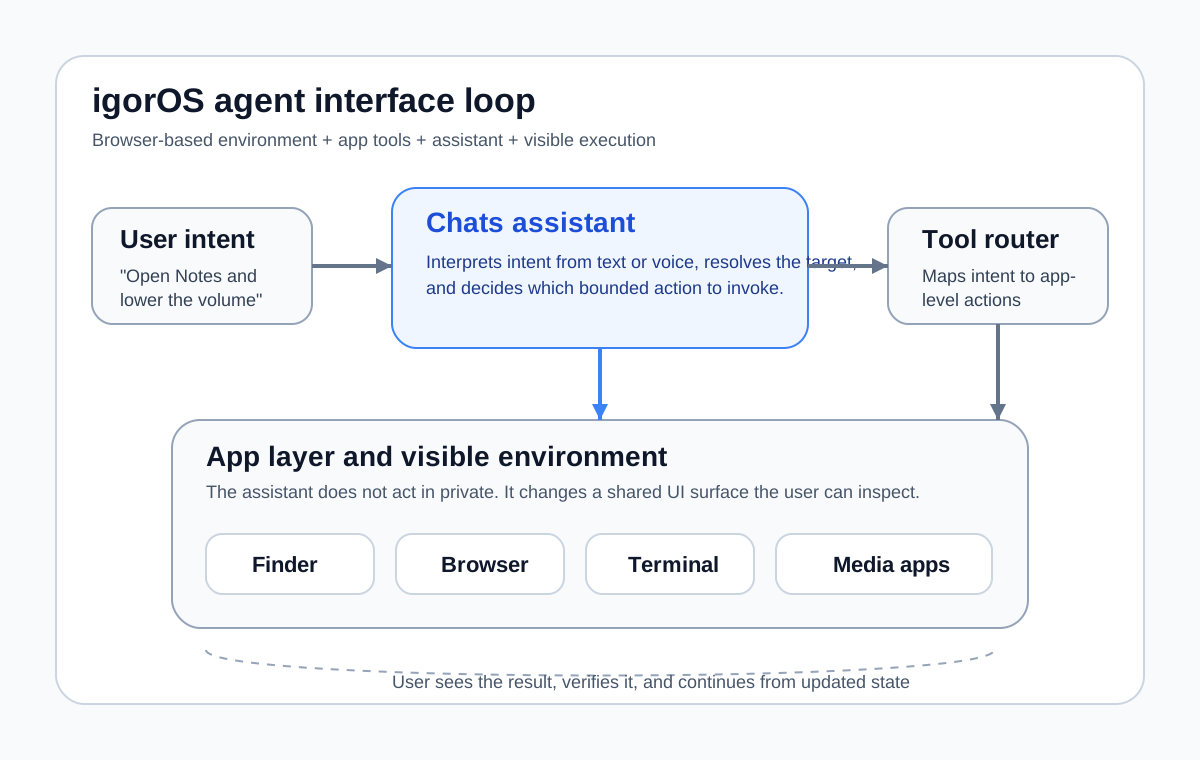
The point of igorOS is to make the agent loop visible: intent, tool call, UI action, and updated state.
The model behind it
The simplest way to describe igorOS is environment + tools + agent.
| Layer | What it does | Why it matters |
|---|---|---|
| Environment | Holds windows, focus state, files, media state, and app context | Gives the assistant something real to act on |
| App layer | Exposes Finder, Chats, Terminal, Browser, media apps, and utility apps | Turns abstract capability into visible tools |
| Assistant | Accepts text or voice, interprets intent, and selects actions | Gives the user a natural-language control surface |
| Execution loop | Maps command to tool call, mutates UI state, and returns the result to the user | Makes the system inspectable instead of magical |
That is why the browser OS metaphor is useful. It gives the user a clear mental model:
- the “computer” is the environment;
- the apps are skills;
- the assistant is the agent that decides which skill to invoke.
If you work on agent systems, this maps directly to the same design question behind Agent or Workflow: How to Choose Architecture Without Hype: what is language deciding, what is deterministic, and what can the user verify after the decision is made?
Why a browser OS works better than a normal chatbot demo
Most chatbot demos hide the hardest product questions.
They usually do not show:
- what state the model can read;
- what tools it can actually invoke;
- what changed after execution;
- where the boundary is between explanation and action;
- how the user can tell whether the system succeeded or failed.
igorOS makes those questions visible.
When the assistant opens an app, creates a note, starts playback, or navigates the browser, the action happens in the interface. The user does not have to trust a textual claim like “Done.” The environment itself becomes the proof surface.
That matters for three reasons:
-
Trust is easier to earn.
Users can see whether the system acted correctly. -
Failure is easier to debug.
If the wrong app opens or the wrong state changes, the problem is observable. -
UX design gets more honest.
The team has to define permissions, targets, action boundaries, and feedback instead of hiding them behind a chat transcript.
This same control problem shows up in production support agents, tool-calling copilots, and retrieval systems with action paths. The difference is that igorOS turns it into a legible demo instead of an architecture diagram.
What the assistant can actually do
The Chats app is the main control surface. It behaves less like a generic chatbot and more like a lightweight system operator for the browser OS.
The assistant can already handle a useful set of actions:
| Category | Example command | Visible outcome |
|---|---|---|
| Navigation and launch | Open Videos |
The app opens in the desktop environment |
| Multi-app control | Open Notes and show Browser |
Multiple windows open and become manageable |
| Media actions | Play music and lower the volume |
Playback state changes in the interface |
| Document interaction | Create a note |
A user-visible artifact is created |
| Orientation | Explain this system |
The assistant grounds help in the current environment |
| Browser-mediated steps | Open the site in Browser |
The assistant uses the browser as another tool surface |
That distinction matters: the assistant is not only answering questions. It is calling tools that mutate the environment.
This is also why the product feels more agentic than a standard site assistant. The control loop is not purely verbal. It is stateful and visible.
Architecture in practical terms
Under the hood, the interesting part is not a giant autonomous runtime. It is a clean stack of UI state, addressable apps, and bounded actions.
At a practical level, the system breaks down into these pieces:
- a React and TypeScript client shell;
- a desktop-style window manager with app state and focus management;
- an app registry so actions can target concrete UI surfaces;
- the
Chatsapp as the language interface; - voice input for short commands when typing is slower;
- a tool layer that maps intent to app-level actions;
- an execution path that updates the environment and exposes the result.
The useful execution loop is simple:
- The user issues a command in text or voice.
- The assistant resolves intent against the available tool and app surface.
- A bounded action is invoked.
- The environment changes in a visible way.
- The user confirms, corrects, or continues from the new state.
That is a much better interaction pattern than “agent thinks in private, then emits a paragraph.” It keeps the assistant grounded in a shared environment.
UX choices that make the agent loop legible
Several design choices are doing more work here than the visuals.
1. Visible state beats hidden state
Windows, focus, files, media playback, and app presence all create a shared context between the user and the assistant. The user can point at the environment, not only at a conversation.
2. Apps act as concrete tools
Because the environment exposes Finder, Chats, Terminal, Browser, media apps, and utilities, the assistant has a real action surface. The user does not have to imagine what “a tool” means.
3. Natural language is paired with direct manipulation
The point is not to replace every button. The point is to let the user mix modes. Natural language handles intent. The UI handles inspection, correction, and follow-up.
4. Voice input fits short commands
Chats includes a press-to-talk mode. That works well for short system-level actions where typing would be slower than speaking.
5. Boundaries stay visible
The assistant is more convincing because it is not pretending to be unlimited. It acts through apps and tools inside the environment. That constraint is a strength, not a weakness.
Where this pattern maps to real products
igorOS is playful, but the design pattern is serious.
The same interaction model can map cleanly to:
- support workbenches where agents open records, draft actions, and surface evidence;
- internal operations consoles where users trigger bounded workflows from natural language;
- admin tools where structured UI still matters but menus are too slow for power users;
- personal productivity environments where the assistant orchestrates notes, browser state, media, and files;
- domain-specific copilots where trust depends on visible execution, not only generated text.
This is also why I treat it as more than a novelty microsite. It is a live demo of the design problem behind many production agent systems: how to combine language, tools, state, and user trust in one interface.
If you want the production counterpart to that problem, MLOps for a Support RAG Agent in 2026 is the more operational version: release gates, safety boundaries, observability, and cost control once the agent stops being a demo.
Features worth testing
If you open igorOS, these are the parts worth paying attention to.
1. Desktop behavior in the browser
Windows move, resize, and stack like a real desktop environment. The system supports language, wallpaper, and theme settings, so it behaves like a configurable workspace rather than a static landing page.
2. Agent behavior you can watch
The assistant does not just describe the next step. It can execute one. That makes the control loop visible and immediately more believable.
3. Real app surfaces
The environment includes Finder, Chats, Terminal, Browser, iPod, Videos, Soundboard, Synth, Virtual PC, and other apps. That matters because the assistant is not acting on mock targets.
4. Natural-language control over UI
Commands like open notes and show videos are useful because they map intent to actions across the environment, not because the sentence itself is impressive.
5. Enough personality to invite exploration
The demo keeps a sense of play. That matters too. People explore more when the system looks like something worth poking at.
How to try it
- Open os.igor-ya.ru.
- Launch
Chats. - Ask the assistant to open any app.
- Try a multi-step command such as opening two apps or changing playback state.
- Watch whether the result is visible in the interface without extra explanation.
The demo is successful if the user quickly moves from “this looks fun” to “I can see how this interaction model would fit a real product.”
Final point
igorOS exists to make one thing concrete:
agents become much easier to understand when they have an environment, tools, and visible state.
That is the leap from chatbot theater to product design. Once the model can act inside a structured environment, UX questions become architecture questions: boundaries, trust, execution feedback, and control.
That is exactly why this kind of demo matters.
FAQ
What is igorOS in practical terms?
It is a browser-based desktop environment where a chat assistant can call tools, open apps, and manipulate visible UI state instead of stopping at text responses.
Why use a browser OS metaphor instead of a standard chatbot UI?
Because the environment makes the agent loop legible. The user can see state, issue a command, watch the action happen, and verify whether the system did the right thing.
Is the assistant autonomous?
No. The assistant is useful because it is constrained. It acts through app-level tools and visible interface changes, not through hidden open-ended execution.
Where does this pattern apply in real products?
It maps well to support workbenches, internal ops consoles, admin tools, and productivity environments where users need natural-language control over a structured interface.